How to run user tests
TL;DR
Summary
Conversations and reactions around an interface with users, which you then synthesize.
Goals
Get precise feedback about how a product or service is used, in order to prioritize improvements.
Definition
User testing is a method for collecting real feedback from users. A facilitator meets with users (usually 5 to 15) and asks them a series of questions based on a prompt (typically a digital interface). This approach helps you understand how and why a product or service is used.
From this you can identify trends, in other words behaviors that recur in given situations. Trends help you prioritize next actions, based on particularly precise feedback. These trends, positive or negative for the product, then need to be checked against quantitative data. User testing alone never lets you validate a decision, because the sample is too small.
The facilitator of a user test must be trained in active listening techniques to make it easier for the participant to express themselves. They will dig into the how to fully understand the person’s journey. They will also dig into the why, through the participant’s emotions and reasoning. Are there any fears? Are there misunderstandings? Where do they come from? And so on.
The 3 main phases of a user test
Preparation - Facilitation - Processing
PREPARATION
1. Identify the pages to test
List the blockers and uncertainty points in the current product or service. To do this, gather data on how the product is used (analytics, satisfaction scores, user feedback, customer support team feedback, etc.).
Also list newly developed features where hypotheses still remain.
From this, derive the main pages that will be covered in the upcoming user tests.
2. Identify the user panel
Describe a group of people who will make up your user panel. To do that, you first need context information about your audience. For example:
- Men aged 20 to 30 who are addicted to their smartphone
- Women, upper socioeconomic bracket, who buy organic products
- People who exercise at least twice a week
If you need several panels for the same test, plan to use multiple recruitment questionnaires, or at least adapt them.
Then identify one or two screening questions for your test. These are questions that let you make sure your user is “relevant” to what you want to test. Following the previous examples:
- You use your phone to send messages: between 0 and 5 times a day / between 6 and 20 times a day / more than 20 times a day (and you’d only keep, for example, those who tick “more than 20 times a day”)
- The last time you cooked, where did you get your ingredients? Supermarket / Local market / Organic supermarket / Local supplier / Other (and only keep those who went to an organic supermarket, for example)
- How many times did you exercise last week? 0-1 times / 2-4 times / 5+ times (then exclude those who exercise less than twice a week)
3. Send the recruitment questionnaire
You now know who you want to recruit, and it’s time to create your recruitment form. Open your favorite form tool (Google Forms, Microsoft Forms, or other) and create your questions.
There are 3 main parts to keep in mind:
- Identity and contact questions (last name, first name, email, phone number, …)
- Screening questions (prepared earlier)
- An availability question (“What’s your availability on the following dates: March 13, March 14, March 15?”)
You can use this one as an example form.
Once written, you need to send it out. The most effective way is the network of your network. Send an email with the link to your form to your group of colleagues / former students / friends / family and ask them: “Do you know any people involved in this topic who could fill out this form?”. Of course, add all the polite phrasing that fits ;)
If this technique seems unsuitable, another option is open to you: extracting from a database based on simple criteria (age range or gender, for example). For a user test with 10 people, plan an extraction of 800 names to get about 20-25 responses and 10-12 qualified profiles. Then send an email through a mass email tool.
Finally, if the previous option isn’t possible, you can go through profile recruitment agencies (https://quali.easypanel.fr/, https://aucoeurduterrain.fr/, or any other you can find on Google).
Bonus tip: post an ad on a classifieds site asking interested people to sign up via the link you provide. Mentioning that there will be gift cards at the end of the test can motivate some.
4. Filter my participants
Once your form is sent, responses will start arriving. Sort your participants based on their answers: exclude unqualified profiles and highlight the ones you’ll keep. Here’s an example of responses to the form above. It can inspire you on the approach to follow.
Once you’ve identified profiles that look relevant, send them an email with the following information:
- a thank you
- the date and time of the test
- the location of the test
- the gift card amount (this technique reduces no-shows during tests)
- a confirmation request
Send an email to the other participants saying they were not selected. You can always reach back out to them if someone drops at the last minute; people who answer this kind of request are usually quite flexible.
Send a reminder email a week and a day before the test to those concerned.
5. How many participants should I recruit?
If you search a bit on the internet, you’ll very likely come across a study saying that 5 users is the ideal number to find the main problems.
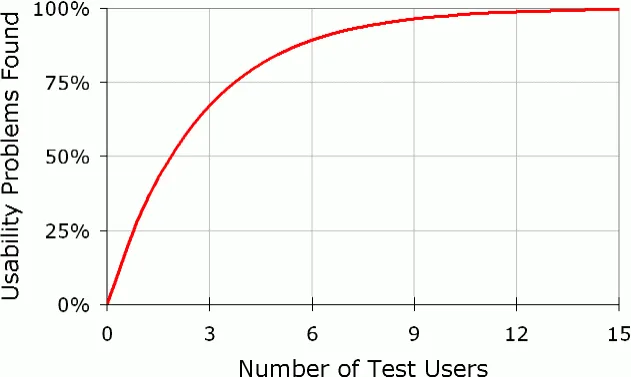
From research by Nielsen Norman Group, a UX reference: https://www.nngroup.com/articles/why-you-only-need-to-test-with-5-users/
This study has been criticized (e.g. here: https://blocnotes.iergo.fr/articles/tests-utilisateurs-mythes-et-realites/ (in French)) but the original author has confirmed that 5 is the right number (https://www.nngroup.com/articles/how-many-test-users/).
My recommendation: 5 users per user panel
My recommendation: 5 users per user panel
My advice: prioritize regular testing over panel quality
— Me ;)
On that last point, I’m not telling you to drop panel filtering, but I’d suggest getting used to running tests regularly rather than chasing the “perfect” test with the “ideal” panel. There will always be a significant bias since the participant sample is very small.
User tests give you trends, they will never let you validate anything.
— Me again :p
6. Prepare your protocol
The most important step is writing the scenarios. Take your list of pages to cover from step 1 and derive a logical sequence of scenarios that will define the scope of the test. You then need to flesh them out so they read as instructions for the different “parts” of the test. These scenarios usually cover a set of pages the user will go through. A standard sequence for an e-commerce site, for example:
- Scenario 1: Discovering a homepage
- Scenario 2: Find an item without guidance (e.g. “You’d like to find a pair of shoes you like, take it from here.”).
- Scenario 3: Find an item with guidance (e.g. “You’d now like to find a pair of red Adidas shoes, take it from here.”).
For the rest, see this example which will guide you through running the test: example test protocol.
FACILITATION AND ANALYSIS
To learn more about facilitation, I invite you to watch this video in English which gives a clear sense of what a user test really looks like.
Also check the listening tips on the Active Listening page.
More broadly, see the document below which describes the facilitation and analysis phases in detail.
Enjoy the read ;)
View the presentation on SlideShare (in French)Going further
- Exploratory interviews: to understand needs before testing
- Active listening: a key skill for running a user test
- Design Sprint: integrates user testing in 4 days
Want to go further?
I offer individual coaching to dig deeper and apply these topics to your context.
Book a session