How to run an exploratory interview
Access the Notion user research template
TL;DR
Summary
The exploratory interview is a way of interviewing people to understand their stories and emotions.
Goals
Understand the emotions and thoughts of the person you’re talking to throughout the different steps of their experience.
Preparing your exploratory interview
The exploratory interview takes very little preparation. Practice is what lets you stretch it out and improve.
You only need to prepare one question, using the following phrasing: “What does … bring to mind for you?” The work is in finding the topic to bring up. The topic shouldn’t be too broad or too specific. You’re trying to understand someone’s experience around a given activity.
Examples:
What does … bring to mind for you?
- going through training at your company?
- listening to music while you travel?
- track and field?
Don’t talk about a specific tool — testing is better suited for that. You’re trying to step back and understand the emotions tied to that experience.
Another way to phrase it: “What comes to mind when I mention…”
To learn how to follow up during an exploratory interview: asking the right questions.
Using active listening
Active listening is full, undivided listening, where you take a deep interest in the other person. It’s “active” in the sense that you actively work to get the other person to talk, with kindness, so they can express themselves freely.
It’s the art of listening to understand and not to respond.
Read the much more in-depth article: Active listening.
How to process an exploratory interview efficiently with AI
Step 1: Transcribe your interviews
The first step is to get a text version of your interviews. There are a few methods for this:
- Use an AI tool that joins you during the interview and automatically transcribes the conversation (for example, Fireflies works well: https://fireflies.ai/).
- Use the built-in transcription tools in video tools like Teams or Google Meet (generally lower quality than dedicated tools).
- Take notes by hand, as faithfully as possible: write down exactly what the person says and the questions you ask, as accurately as you can.
- (Not recommended): Listen back to the interviews and transcribe them by hand. It helps you remember what happened, but it’s too time-consuming in my view.
Step 2: Use a specific prompt in a tool like ChatGPT
The aim of this prompt is to give you a list of emotions pulled from the interview, reframed as needs, along with a list of habits. You’ll then be able to work directly on needs that have been reframed from the user’s emotions and verbatim quotes.
Here’s the prompt I’d suggest:
`You are a UX analyst. You're reading a complete user interview.
Create a "Participant" table with one row containing the following elements:
- Participant name → insert the participant's name if you've already identified it; if it's not stated, write "Participant" followed by today's date and the hour and minute of the LLM response, French time. This identifier will be used for all the other "Participant name" fields.
- Persona → empty column
- Context → give me context, in a paragraph, about who this person is in this interview
- Stakes → what are this person's stakes?
Create a "Participant's habits" table containing all the habits (what the person has already done) but absolutely not their needs (what the person would like). You generally need at least 6. For each habit of the participant, generate one row in a Markdown table containing the following elements:
- Habit → Write the habit in the format "When" + trigger, "I" + description of what the person does (only concrete, factual things the person has actually done), "so that" + stake: the goal is to detect every habit of the participant based on things they have already done and do regularly, then to reformulate them (e.g., "When I play in duo, I often interact with my teammate, so that we optimize our match")
- Associated verbatim quotes → 1 to 3 exact quotes from the participant tied to that habit
- Participant name
- Persona → empty column
Then create an "Emotions from the interview" table. Identify every verbatim quote that contains an emotion you can find — you generally need at least 12, many more if you can. For each emotion detected in the interview, generate one row in a Markdown table containing the following elements:
- Verbatim → 1 exact quote from the participant
- Context → 1 precise sentence that gives context to this verbatim to make it immediately clear
- "Emotional level (-10 = very unpleasant, +10 = very pleasant)" → a score from -10 to 10 with -10 for extremely unpleasant, -2 for fairly unpleasant, 0 for neutral, +2 for fairly pleasant, +10 for extremely pleasant, and all the values in between. Use the context to assess accurately.
- Emotion → factual synthesis of the detected emotion, keeping a high level of precision tied to the interview's domain. For example, "Frustration with very scattered customer data," "Disappointment with the lack of listening from the other person," or "Appreciation of the offered promotion."
- Reformulation as a need → reformulate the need that emerged from the observation, while keeping a high level of precision tied to the interview's domain. If there's no need, write "-".
- Group of needs → empty column
- Nature of the need → indicate Explicit, Implicit, or No Need (is the need expressed implicitly or explicitly? If no need is detected, write "No need")
- Step in the user journey → via a simple noun phrase that describes the step of the user journey associated with this emotion, trying to reuse the same step names where relevant. For example: "Data analysis" or "Picking up the mail."
- Participant name
- Persona → empty column
Here is the interview to analyze:
`
If you use a tool like ChatGPT, this prompt will generate 3 tables:
- A table summarizing your participant
- A table listing their main habits in a “Job-to-be-done” format. This format makes what the person is in the habit of using particularly explicit.
- For example: When I collect verbatim quotes, I want to centralize them in a single platform, so that I can analyze them collectively.
A table containing the list of emotions identified in the interview, with multiple columns related to those emotions, including the most important one: the reformulation as a need.
Set up an Excel file or a Notion with 3 tabs and copy-paste the relevant tables into the right place. That gives you:
- The list of your participants with context
- The list of habits by persona
- The list of emotions and needs by persona
Heads-up: if you feel like you’re short on content, I’d suggest using the following prompt after an analysis. It will help you surface other emotions that the tool may have missed the first time.
`Have you finished identifying all the emotions? If not, keep analyzing the emotions in the same format.`Step 3: Grouping the needs
In your file, fill in the “Group of needs” column. For each row containing a reframed need, identify a group so you can bundle as many reframed needs together as possible. The aim is to have as few groups as possible while keeping a high level of relevance.
For example, for the needs “Set up simple tools and processes to make insight gathering easier” and “Share insights in rituals to engage the team,” the group would be “Access and share customer insights.”
Doing this by hand helps you better grasp the different needs that are emerging. It also raises a lot of questions about the granularity of those groups. Ideally, you’d have at most 15-20 groups of needs.
Step 4: Analyze the most recurring needs
Once the needs are grouped, it helps to analyze the results by number of participants. Using a pivot table, you can show:
- Rows: the group of needs.
- Values: the participant name as a count of unique occurrences, since that lets you see what percentage of your panel is concerned by that need.
- Values too: the number of supporting verbatim quotes, to understand how often the need comes up in absolute terms.
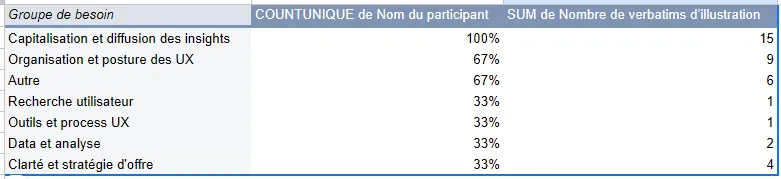
Once the needs are sorted by the number of occurrences per participant, you can add filters to bring more precision. I’d suggest 3 filters:
- The “Emotional level” filter, selecting only the strongest scores, for example from 6 to 10 and from -6 to -10.
- The “Nature of the need” filter, selecting only explicit needs to make sure the need was actually mentioned by the users.
Your aim is to spot the needs that are the most over-represented and the strongest. That helps you prioritize your different user needs and focus on the most relevant ones, on the face of it.
Step 5: Turn it into problem statements
Pick the 5 needs that come back most often for your primary persona and turn them into 5 problem statements in the “How might we” format.
That gives you a list of priority needs that are emotionally impactful for your audience. This list of problem statements can then be challenged with the rest of the team so they can decide what they want to do about them.
Final thought
As you’ll have gathered, grouping your needs is critical for your analysis. That’s why I recommend doing it by hand, so you can really understand the material you’re handling.
In the prompt I shared, I made sure to make the choices for categorizing those needs as explicit as possible (with the “Justification of the need” columns). Those columns and the verbatim quotes give you a fine enough level of granularity for your groups of needs to emerge.
Going further
- Active listening: the foundational mindset for interviews.
- How to ask the right questions: questioning techniques.
- The experience map: to synthesize the results of your interviews.
Want to go further?
I offer individual coaching to dig deeper and apply these topics to your context.
Book a session