How to analyze user interviews (with AI)
TL;DR
Summary
Analyzing user interviews is an essential phase that follows the interviews themselves. It helps you identify which problems matter most so you can solve them next.
Goals
Identify a small number of highly relevant problem statements for your users, based on interviews that generated huge amounts of sometimes contradictory data, all while saving time with AI!
What is user interview analysis
In my view, interview analysis is the most important phase of the user research process. It heavily shapes the rest of the design process (notably through the Design Thinking approach), since this is when you reframe your initial problem statement before moving into ideation.
To be precise, you’ll need to:
- Identify the most relevant verbatim quotes from your user interviews
- Reformulate these quotes and group them into needs and habits
- Derive personas to segment your results
- Prioritize the most important problem statements persona by persona
This step is the most time-consuming part of the user research process (also called the discovery phase). It usually requires re-reading your interviews, precisely identifying the emotions behind the quotes to categorize them properly, grouping them in a meaningful way, and finally landing on the 2-3 most important problem statements.
To make this concrete, I came up with a formula to measure the impact of the different needs that surface in the interviews I’m processing:
Impact = share of people concerned * emotional score ²
— For negative emotional scores, corresponding to unpleasant emotions
Impact = share of people concerned * emotional score ² / 2
— For positive emotional scores, corresponding to pleasant emotions
What does this formula tell us? First, it requires you to precisely measure how many people discuss a given need. So you need to be precise about which verbatim quotes to identify across your different users. Which means:
- you need to know which persona you’re working on
- you need to identify the relevant verbatim quotes from the interviews
- you need to categorize them properly afterwards
- all of this takes time (typically 10 hours for 10 interviews) because you need to do it across all the verbatim quotes to get a reliable proportion (a ratio between the number of verbatim quotes for a given need per person and the total number of participants)
- the way you run your interviews has a major impact on your results downstream. That’s exactly why I’m pointing you to a page on How to ask the right questions to minimize bias in your interviews and forms.
Second, this requires you to assess the emotion behind each verbatim quote, since this will be used to prioritize problem statements. Which means:
- you need to assign a score to each verbatim quote
- you need to group needs based on pleasant or unpleasant emotions
- you need to be able to use the emotional scores for a given need
Finally, the formula highlights that pleasant emotions have “less impact” than unpleasant ones. That means you need a lot of pleasant emotions for them to rise into the most important needs.
All of this for what?
To produce a prioritized list of needs. This list helps you spot the needs that seem most important for a given audience, based on recurrence and emotional impact. That lets you identify the few problem statements that look most important! Pretty handy :)
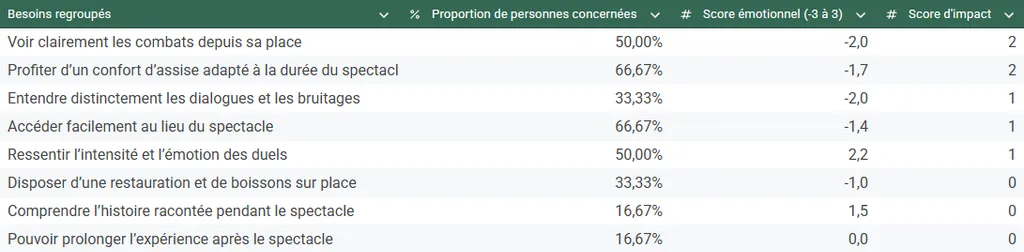 Example of a table prioritizing the most important needs from interviews
The clarity that comes out of this kind of table is genuinely hard to reach. Often, you’re swamped with hundreds of different verbatim quotes, which you categorize into dozens of groups, contributing to a sense of confusion driven by the sheer amount of data.
Why use AI to analyze interviews
How could AI help here? The answer is simple: it saves time. And it’s very easy to use.
My goal here is to enable you to do as many of the user research steps as possible using only a generative AI like ChatGPT. An LLM (Large Language Model) that’s easy to use and accessible.
Be careful with data confidentiality. Make sure you don’t send confidential or sensitive information to tools like this. Also make sure you anonymize your interviews before processing them.
I’ve identified 3 ways to use it to save time while staying effective.
Identifying and enriching verbatim quotes (Time savings: ➕➕➕ / Quality: ➕➕)
A generative AI like ChatGPT (the tool I’ll use throughout the rest of the process) is particularly effective at identifying text fragments and enriching them. So sending in an interview that’s been transcribed beforehand to extract the most relevant verbatim quotes is incredibly efficient.
Pros:
- Huge time savings (1 minute of processing max versus 30 to 50 minutes by hand) to detect the different relevant verbatim quotes and enrich them (identifying the emotion, reformulating into a need, identifying the user journey step, etc.)
- Strong ability to enrich, thanks to its ability to “fill in the boxes” you ask it to fill
- Structured content that’s easy to process afterwards
Cons:
- Difficulty getting the full set of verbatim quotes for an interview (response size limits)
- Difficulty knowing how exhaustive the verbatim quote identification was (impossible to understand its selection logic)
- Misinterpretation on 5 to 15% of verbatim quotes, either through error (less than 2% of cases, my personal estimate), or through wording that’s too vague (5 to 15% of cases, my personal estimate)
Grouping needs, habits and steps (Time savings: ➕ / Quality: ➕)
A generative AI is fairly good at grouping (also called clustering). However, these models weren’t trained for this and there are AI models more suited to this operation. Still, since my goal is to use a single tool, the results will be coherent, but can leave something to be desired.
That’s why I tend to recommend doing this step by hand: it gives you a better feel for the data you’re handling and lets you adjust as needed.
Pros:
- Significant time savings (1 minute of processing max versus 30 to 50 minutes for the full set of interviews) to group items that are already labeled (needs, habits, steps)
- Effective identification of results since the data is provided as input
- Consistency of the output since results follow a single instruction
Cons:
- Difficulty predicting the expected number of groups even though that data is in the initial instruction (it’s strongly recommended to specify the expected number of groups as input for better efficiency)
- Difficulty defining the expected granularity, leading to mixed results (and sometimes requiring multiple iterations)
- High variance in results despite explicit instructions (2 different attempts will very often produce 2 different results)
Surfacing personas from habits (Time savings: ➕ / Quality: ➕➕)
Again, on-the-fly data analysis and group construction isn’t the strongest suit of LLM-type models. However, in a persona, you need to add descriptions and context, which is exactly where ChatGPT is very strong. This makes the proposed segmentation easy to grasp and assess.
This step isn’t essential in user research because personas are often identified a priori, that is from the interviews themselves. Still, I find it useful to try to define personas based on behavior, not just job or experience (which is often the case). That’s why I insist on the distinction between needs (from emotions) and habits (from facts), so you can surface personas from interviews and push the analysis even further.
Pros:
- Ability to spot patterns that are hard to detect without being a data expert
- Ability to segment all participants into personas, allowing for much finer analysis
- Significant time savings on persona generation and on associating them with participants (1 min per iteration versus 1h of analysis for a data expert)
Cons:
- Difficulty predicting the expected number of personas even though that data is in the initial instruction (strongly recommended to specify the expected number of personas as input for better efficiency)
- Difficulty assessing the relevance of the proposed personas, since depending on the behaviors chosen to build the personas, the story behind can differ
- Relatively high variance in results despite explicit instructions (2 different attempts will often produce 2 slightly different results)
My recommendations for using AI in user interview analysis
Use AI.
At the very least, try it and see for yourself how effective this tool is, especially for identifying and enriching verbatim quotes. Personally, in a professional context, I systematically use this method to analyze my interviews given the time savings I get. For very high-quality results.
All this gives you a big analysis table that references all your interview verbatim quotes, which is easy to populate and reuse downstream.
Regarding more advanced processing related to automatic grouping, I’m a bit mixed on that. Getting your hands dirty by re-reading all the verbatim quotes once the interviews are done remains effective for deeper analysis. The risk here is that, if you lack distance, you might end up with groupings that don’t fit the story you’re building. So I’d be especially careful about that. I do recommend it, but take the time to systematically re-read all the results you get.
As for persona detection, I find this very interesting and innovative as a result. It’s worth trying. The advantage is that the instructions are easy to evolve and iteration is particularly simple. So I do recommend it.
The approach to analyze your user interviews with AI (with all prompts provided)
Step 0: Run and transcribe your interviews
The first step is to get a text version of your interviews. There are several methods:
- Use an AI tool that supports you during the interview and automatically transcribes the conversation (for example, the Fireflies tool is effective: https://fireflies.ai/)
- Use the transcription tools built into video tools like Teams or Google Meet. (usually lower quality than dedicated tools)
- Take notes by hand, as faithfully as possible: write down exactly what the person says and the questions you ask, as accurately as you can.
- (Not recommended): Re-listen to the interviews and transcribe them by hand. It’s good for refreshing your memory of what happened, but in my view it’s too time-consuming.
Step 1: Identify and enrich the most relevant verbatim quotes (via a specific prompt)
The point of this step is to make the analysis of your interviews systematic. You can absolutely do these things by hand, but that’s not the goal here.
Using this instruction (I’ll use the terms prompt and instruction interchangeably), you’ll get 3 tables that you’ll copy/paste into an Excel / Google Sheets / Notion file.
- a list of participants
- a list of habits based on a first selection of verbatim quotes (based on facts) in the following format:
- The goal is to detect all the participant’s habits based on things they’ve already done and do regularly, then reformulate them
a list of needs based on a second selection of verbatim quotes (based on emotions) enriched as follows:
- what is the context?
- what is the associated emotion?
- what is the strength of this emotion?
- what is the need behind this emotion?
- is it an implicit or explicit need?
- which user journey step does this verbatim quote relate to?
Here’s the prompt I’d suggest:
`You are a UX analyst. You are reading a complete user interview.
Create a "Participant" table with one row containing the following:
- Participant name → insert the participant name you've already identified, and if not specified, write "Participant" followed by today's date and the hour and minute of the LLM response, French time. This identifier will be used for all other "Participant name" fields
- Persona → Empty column
- Context → give me context in a paragraph about who the person is in this interview
- Stakes → what are this person's stakes?
Create a "Participant habits" table containing all habits (what the person has already done) but explicitly not their needs (what the person would like). You usually need at least 6. For each participant habit, generate a row with the following items in a Markdown table:
- Habit → Write the habit in the format "When" + trigger, "I" + description of what the person does (only concrete and factual things the person has done), "in order to" + stakes: the goal is to detect all the participant's habits based on things they've already done and do regularly, then reformulate them (e.g. When I play in duo, I often interact with my teammate, in order to optimize our game)
- Habit group → Empty column
- Associated verbatim quotes → 1 to 3 exact quotes from the participant tied to this habit
- Participant name
- Persona → Empty column
Then, create an "Emotions from the interview" table. Identify all the verbatim quotes containing emotions you find; you usually need at least 12, many more if you can. For each emotion detected in the interview, generate a row with the following items in a Markdown table:
- Verbatim quote → 1 exact quote from the participant
- Context → 1 precise sentence that gives context to this verbatim quote to make it immediately clear
- Emotional level (-3 = very unpleasant, +3 = very pleasant) → a score from -3 to +3 with -3 for extremely unpleasant, -1 for fairly unpleasant, 0 for neutral, +1 for fairly pleasant and +3 for extremely pleasant and all in-between. Rely on context to evaluate properly.
- Emotion → factual synthesis of the detected emotion, keeping a high level of precision tied to the interview's domain. For example "Frustration with very scattered customer data", "Disappointment about the lack of listening from the contact" or "Appreciation for the offered promotion"
- Reformulation as a need → reformulate the need from the observation, while keeping a high level of precision tied to the interview's domain. If there's no need, write "-".
- Needs group → Empty column
- Need nature → Indicate Explicit, Implicit or No Need (is the need expressed implicitly or explicitly? if no need is detected, indicate "No need")
- User journey step → using a simple noun phrase that describes the user journey step associated with this emotion, trying to reuse the same step names if relevant. E.g. "Data analysis" or "Mail collection"
- Steps group → Empty column
- Participant name
- Persona → Empty column
Here is the interview to analyze:
`
Pair this prompt with your transcript, either by copy/pasting it here if it’s not too long (notes, short interview) or by directly uploading a Word file that the tool will parse.
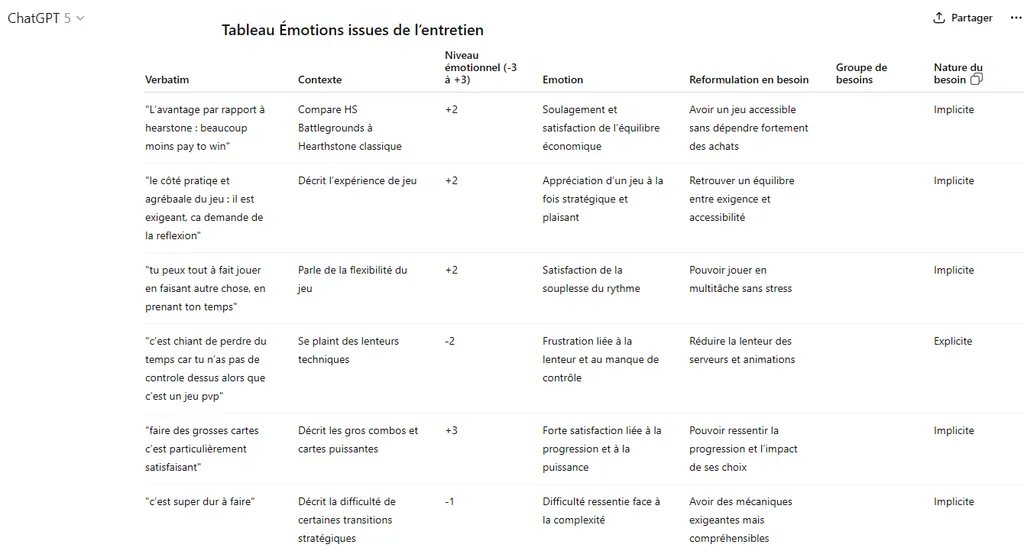 Example of processing an interview via ChatGPT. The icon with the 2 squares next to “Need nature” lets you copy the entire table to paste it into a spreadsheet.
Create yourself an Excel, Google Sheets or Notion file with 3 tabs and copy/paste the relevant tables in the right place. This will give you:
- the Participants tab containing your list of participants with context
- the Habits tab containing the list of habits per participant
- the Needs tab containing the list of emotions and needs per participant
Note: if you feel the verbatim generation is missing content, I’d suggest using the following prompt at the end of an analysis. This will help surface more emotions that might have slipped under the radar the first time.
`Are you done identifying all the emotions? If not, continue analyzing emotions in the same format`So run this operation for your various interviews before moving to the next step.
Step 2: Grouping the needs
In your file, you’ll notice several empty columns. The “Needs group”, “Habit group” and “Steps group” columns are empty, as well as all “Persona” columns.
❗ For simplicity, we’ll first focus only on the Needs group column. The other columns will be filled in via the “Going further” part of this guide.
The goal of the “Needs group” column is to gather similar needs, given that the AI did its best to reformulate those needs. As mentioned earlier, I’d encourage you to do this work by hand. Re-reading the verbatim quotes from the interviews, checking their reformulation and adjusting the emotions helps you understand the material at a finer grain, which boosts your relevance.
So, for each row containing a reformulated need, identify a group to bundle as many reformulated needs together as possible. The goal is to have as few groups as possible while keeping high relevance. I usually try not to mix unpleasant and pleasant emotions, I prefer separating emotions of different nature into distinct need groups. The sweet spot is usually 15 to 20 needs groups in total.
For example, for the following needs, “Setting up simple tools and processes to make insight reporting easier” and “Sharing insights in rituals to engage the team”, the group would be “Access and share customer insights”.
Now, if you decide to go through an “AI” step, you can use the following prompt by attaching your spreadsheet in Excel format directly to the tool you’re using. It will generate an Excel file you can open.
In the file I'm providing, the goal is to fill in the needs group column.

For this, I need you to take all the needs and group them, so I can go further in the analysis afterwards. The total number of groups must be at most 15% of all needs.

Step 1:

Separate needs associated with pleasant emotions (scores from 1 to 10) on one side and those associated with unpleasant emotions (-10 to 0) on the other

Step 2:

Build groupings first based on unpleasant emotions

- A grouping has strong semantic proximity between the various needs that compose it

- A grouping is named in the format infinitive verb + complement so it's easily understandable and consistent. This grouping must keep a high level of precision tied to the domain of the related needs. (e.g. "Maintain consistency with rule standards" for a topic on board games)

- A grouping cannot have a single element

- Avoid having "Other" groupings that are too large

Step 3:

Do the same for pleasant emotions

Step 4:

Verify that each grouping contains only unpleasant or only pleasant emotions (no mix).

If not, reassign the misplaced needs to the corresponding groups.

If the number of groups is too large, regroup pleasant needs with other pleasant ones. Do the same for unpleasant ones.

Step 5:

To verify, give me the list of all the needs you've identified and the number of associated verbatim quotes in the chat.

Finally, provide me with the Excel file with the needs group column filled with exactly the same items provided in the list and with the same associations.

Constraints

- Do not ask any questions, do not ask for confirmation.
- Provide only the final structured result, with no introduction or conclusion.
- Display the list of needs then the Excel file to download
Then copy the “Needs group” column you get and paste it into your initial file; the order is preserved.
Once that’s done, I strongly encourage you to re-read the results and adjust the groups based on the quality you’re aiming for.
Step 3: Identify the most recurring problem statements
Things get a bit more sporty here. If you use Notion, you can use cross tables. For others, you’ll use a Pivot Table (the entire setup is shown in the image below).
- Select your full Needs table (CTRL + A)
- Click Insert, then Pivot Table
- Add “Needs group” as a row
- Add “Participant name” as a value and set it to count unique occurrences (COUNTUNIQUE in Google Sheets), then display this as a percentage of a column
- Add “Emotional level (-3 → +3)” as a value and set it to AVERAGE to get the mean of the scores
- Add a calculated field, set “Summarize by” to Custom and use the following formula (in Google Sheets): = COUNTUNIQUE(‘Participant name’) * AVERAGE (‘Emotional level (-3 → +3)’) ^ 2 * (0.75-0.25 * SIGN(‘Emotional level (-3 → +3)’))
- This is the formula presented earlier in single-line calculation form. Remember to update the fields if you renamed columns
- The most attentive among you will have noticed that this formula displays the number of participants and not the proportion. It just isn’t computable in Google Sheets and the result comes out the same
- Sort your table by “Calculated field” descending.
- Observe the prioritization order, which surfaces the needs most present among your participants crossed with the strongest emotions
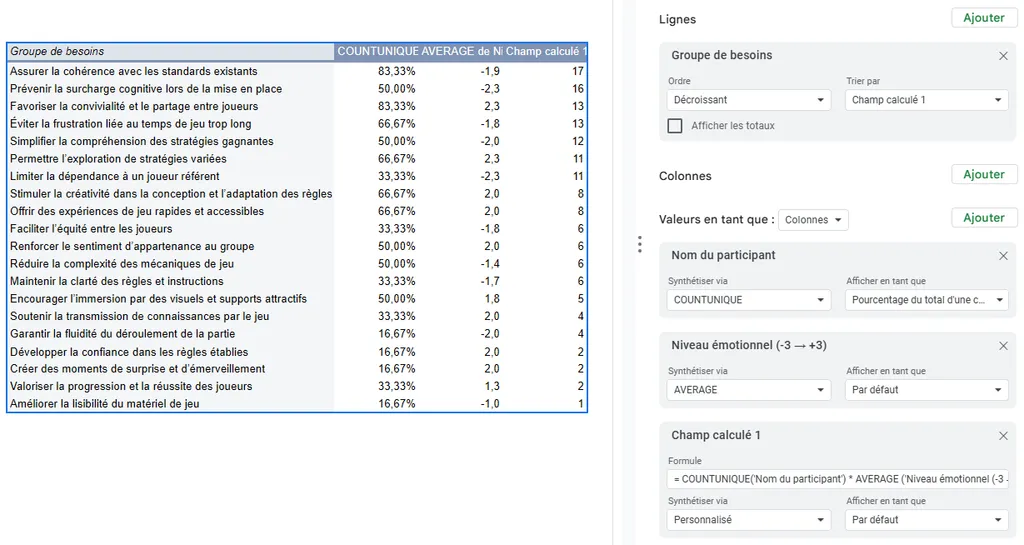 You’ll find on this diagram all the setup needed to get these results.
Step 4: Derive problem statements
Pick the top 5 recurring needs and turn them into 5 problem statements in the “How might we” format.
This gives you a list of priority needs that are emotionally impactful for your audience. This list of problem statements can be challenged with the rest of the team so they can take a position on what they want to do about them.
Going further: persona segmentation
As explained earlier, you can surface personas from your interviews. To do this, you first need to group the habits to process them and surface personas. The point is to group your habits to reduce them into a more coherent set (notably to avoid having the same idea many times under different wording).
As with needs, you can do this work by hand for the highest quality.
Otherwise, the first prompt I’d suggest, paired with the file you exported in Excel format, is the following.
In the file I'm providing, the goal is to fill in the habit group column. For this, I need you to group all habits that are similar or semantically close into this column, so I can go further in the analysis afterwards. I want these groups to keep the same semantic structure as the initial habits, that is their wording stays in the form of when / I do / in order to. It would be preferable for you to first try to create clusters across all habits before filling in the table directly. Can you give me this table with the habit group column filled? Don't ask me for confirmation and just deliver the file directly.This will provide you with an Excel file you can open and you can copy/paste the “Habit group” column into your file.
Once that’s done (or once you’ve finished filling in the “Habit group” column of the file), re-export your file and pair it with the following prompt.
You are an expert in user research and behavioral segmentation. Work only from the distinct habit groups to build the personas. Follow the steps below exactly.

1. Deterministic preparation

- Build the Participants × Habit groups matrix (1/0).
- For each participant, list their habit groups (exact text from the file).

2. Building the personas

- Constraints for persona creation
    - Minimum size: it's absolutely impossible for a persona to contain only 1 participant
    - Common habits: a persona is formed when it shares more than 2 common habits between participants
    - Participant - persona uniqueness: each participant belongs to a single persona. In case of multi-match, assign them to the persona where they share the most habits
    - Fixed number of personas: Create exactly 2 personas
- Group the participants into personas

3. Consistency checks

Verify that the conditions are met and modify personas if not:

- sum of participants = total,
- 0 duplicate participants,
- no persona < 2 participants,

4. Create a "Personas" table. For each persona, generate a row containing the following items in a Markdown table:

- Persona: clear and descriptive name of the persona, not of the group (e.g. Experienced driver, not The experienced drivers)
- Description: a synthetic description (50 words max) including: what distinguishes them and what they don't do compared to the other personas
- Associated participants: separated by a line break
- Common habits: separated by a line break.
- Explanation of participant choice: explain in detail why this group includes the chosen participants in an accessible way and why others are excluded

5. Export

- In the "Participants" tab, fill in the "Persona" column
- Add a new tab named Personas containing the Personas table
- Provide the updated Excel file

Constraints

- Use exactly the labels from the file (no rephrasing of habits).
- Do not ask any questions, do not ask for confirmation.
- Provide only the final structured result, with no introduction or conclusion.
- Display the Personas table then the Excel file to download
This will let you retrieve:
- a list of 2 personas you can add to your file in a new “Personas” tab
an Excel file associating your different participants with personas
- Copy the persona list from the Participants tab into your file
Victory: you now have a list of participants associated with personas plus a list of personas with a description and common habits. But you can go one step further. In the Needs and Habits tabs, select the empty fields in the Persona column and add the following formula:
=XLOOKUP(INDIRECT("RC[-1]";0); Participants!$A:$A; Participants!$B:$B; "Not found")This formula displays in the Persona column the persona linked to the right participant. Handy for filtering.
You can then go back to your pivot table and add the “Persona” element under “Filters”. This lets you focus on only the needs associated with a given persona.
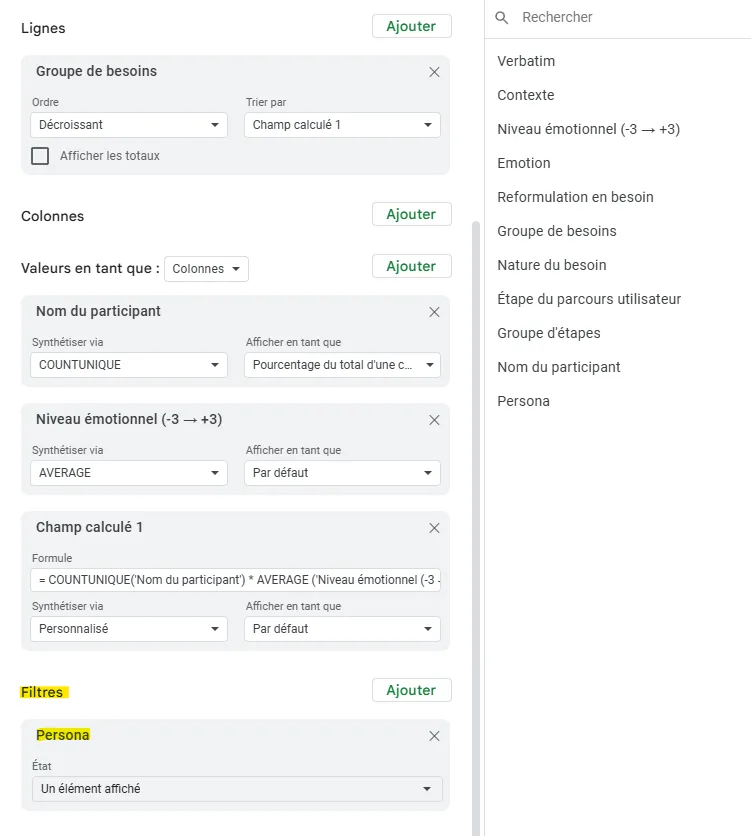
Going further: helping create the experience map
The last empty column is “Steps group”. The point is to group your steps to reduce them into a more coherent set (notably to avoid having the same idea many times under different wording).
As before, you can do this by hand for the highest quality.
Otherwise, the prompt I’d suggest, paired with the file you exported in Excel format, is the following.
In the file I'm providing, the goal is to fill in the steps group column. For this, I need you to group all steps that are similar or semantically close into this column, so I can go further in the analysis afterwards. I want these groups to keep the same semantic structure as the initial steps, that is their wording stays as a simple noun phrase describing the user journey step associated with this emotion. It would be preferable for you to first try to create clusters across all steps before filling in the table directly.

I need 12 steps maximum. You can add an Other category if needed.

Can you give me this table with the steps group column filled? Don't ask me for confirmation and just deliver the file directly.
This will provide you with an Excel file you can open and copy/paste the “Steps group” column into your file.
From here, you can create a new pivot table with the following criteria:
- As a row, add Steps group
- As values, add the emotional level, set to the average of the scores (Choose AVERAGE here)
- As a filter, add the persona filter
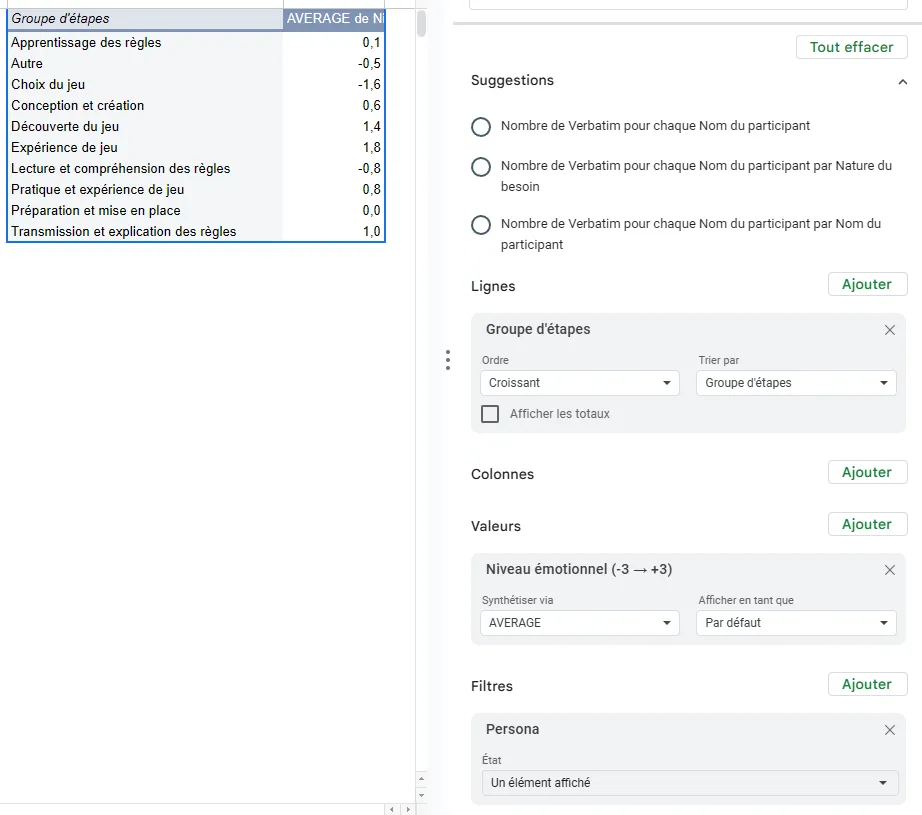
This lets you visualize the different steps of your experience map (to reorder in another deliverable) and gives you a precise emotional score for each step.
It’s a handy aid to speed up creation. You can even access the verbatim quotes and needs directly by double-clicking on one of the emotional score values (remember to delete the new tab created once you’re done reading, if applicable).
A final word
Alright, here we are. Step by step, you’re becoming serious data experts, don’t you think?
If you’ve followed everything, step by step, you should normally have a spreadsheet that contains nearly all your user research, with:
- all your verbatim quotes highly structured
- your personas built on the basis of their habits
- your problem statements prioritized by persona
- the different steps of your experience map with the associated emotional score
Pretty cool, right? All in less than 1h, with no review. But you MUST review, so plan more like 4 solid hours to verify all your results.
What I’m sharing here, I would have dreamed of having a few years ago. You can’t imagine the time saved by the structure I’m proposing and by automating the fill-in via AI. I’m tooting my own horn a bit, true, but a lot of work went into reaching this result :)
If you should remember 3 things
- Take the time to identify the most relevant verbatim quotes based on your participants’ emotions, that’s the most important part
- Reformulate these verbatim quotes as needs; it’ll help you build your problem statements afterwards
- Tag your verbatim quotes with an emotional score; it’ll help you with prioritization afterwards
A big hug to those who made it this far ;)
Going further
- Exploratory interviews: the collection phase that precedes analysis
- Experience map: to synthesize the results of your analysis
- How to ask the right questions: to gather rich material
Want to go further?
I offer individual coaching to dig deeper and apply these topics to your context.
Book a session